Azure Cosmos DB is Microsoft’s latest multi-model database which can be distributed globally across any geographic region. Launched in 2017, Azure Cosmos DB is enhanced over and above its predecessor- Azure DocumentDB. Cosmos DB manages to excel and improvise over other players in the market via adherence to Service Level Agreements (SLAs) in terms of their performance including throughput, availability, and consistency. It is available to try Free of charge without any subscription or commitment.
To understand the key functionalities of Azure, it is important to analyze its underlying architecture from a high level:
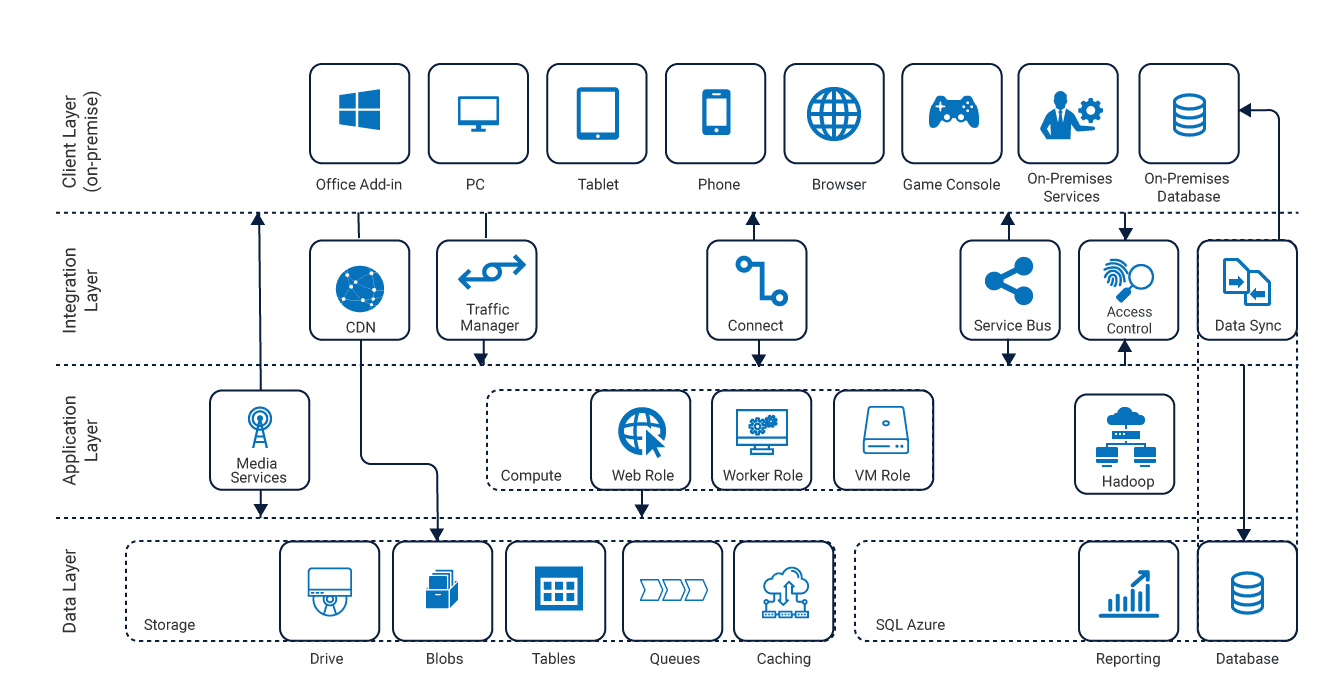
The figure above clearly indicates how Azure Cosmos DB functions in the data layer. Drilling down to the basics will yield more information on its Scalability, Resilience and Availability making it the front-runner for databases today.
To understand the benefits of Azure holistically, it is imperative to look at how Azure is compatible with each of the following popular architectural styles:
The traditional N-tier architecture for enterprise applications manages dependencies by dividing them into layers performing logical functions. Every new layer sits below the previous layer in a horizontal fashion. N-tier is used for migrating existing applications using infrastructure as a service (IaaS) solutions, or applications that use a mix of IaaS and managed services. Azure Cosmos DB can be deployed seamlessly with N-Tier architecture when used as an IaaS.
For a PaaS solution, a Web-Queue-Worker architecture provides a web front end handling HTTP requests and a back-end worker performing long-running operations communicating with each other through an asynchronous message queue. With Azure’s use as PaaS, this style of architecture is also suitable and deployable.
For a more complex domain, Microservices architecture is ideal where API contracts are used for communicating between services. With the use of DevOps culture and Azure’s flexibility, Microservices contribute to one of the key factors for its popularity.
Last but not the least, Event-Driven Architectures using a publish-subscribe (pub-sub) model, are capable of handling applications ingesting and processing huge chunks of data with minimum latency, Azure Cosmos excels in here as well with its scalability. Internet of Things(IoT) is an ideal example
Apart from supporting the above conventional styles of architecture, Azure Cosmos DB also supports Big Data and Big Compute making it one of the most versatile solutions in the market today.
Azure inculcates the following 10 design principles for its hosted applications:
- Self-healing
- Redundancy
- Minimal Coordination
- Design to scale out
- Partition control
- Design for operations
- Managed services
- State-of-the-art storage technology
- Design for evolution
- Relevant business needs
Azure Cosmos DB follows the 5 criteria for quality adherence with well-defined Service Level Agreements (SLAs):
- Scalability: The capability to handle increased load using both horizontal and vertical scaling
- Availability: The functional success of a system depends upon its availability with minimum downtime. Azure adheres religiously to well-defined SLAs to make sure these objectives are met.
- Resiliency: The capability to recover from failure and resume performance is built within Azure including services like Azure Storage, Azure Managed Disks and Virtual Machines or VMs.
- Management: Seamless operation of processes which keeps its system up and running is achieved using the DevOps model and implemented successfully by Azure.
- Security: Threat protection and intrusion detection processes in place to facilitate data safety using services like Azure Security Center.
In the following section, we are going to explore these attributes in further detail with respect to its Key Features.
Data can be distributed globally to any number of Azure regions with just a click of a button, thereby allowing storage nearest to the customers reducing possible latency issues. This is achieved using Azure’s multi-homing APIs which identify the nearest data center to the user’s location. It allows flexibility to allocate multiple numbers of regions without any changes in configuration or availability of the stored data.
Scaling of storage In Azure Cosmos DB is transparent and automatic to make your data management easier. It supports the following 2 types of containers across all APIs:
Fixed Container: Fixed containers can store up to 10 GB with a maximum of 10,000 request units per second (RUPS). Fixed containers are created without specifying any partition key property in the data.
Unlimited container: Unlimited containers can automatically scale data beyond 10-GB through horizontal partitioning with auto-balancing of data based on the partition key specified. This allows storage of virtually unlimited amounts of data up to 100, 000 request units per second or more by getting in touch with their support team.
Cosmos DB allows automatic partitioning capability using containers for storing data titled collections (for documents), graphs, or tables. These Containers or logical resources span physical partitions or servers. Cosmos DB determines the number of partitions across servers based upon the size of storage and throughput commissioned for the container. Each document is assigned a partition key and a row key for unique identification and prevents Azure Cosmos DB from distribution across various physical partitions.
The two types of possible partitions are:
Physical Partition: These partitions provide fixed SSD-Backed storage with variable compute resources namely CPU and Memory. Azure automatically scales the number of physical partitions based on workload and hence the identification of the right partition key is important.
Logical Partitions: Logical partition is a partition within a physical partition which stores all data with a pre-defined partition key value. As a result, multiple logical partitions can be stored in the same physical partition.
Let us look how partitions are achieved in Azure Cosmos DB.
Documents consist of a Partition Key and a Row Key, unique identifiers which form the backbone of the partitioning system. Partition Keys form the logical partition of the data which reside within a single physical partition managed by Azure Cosmos DB succinctly.
To achieve successful partitioning in Cosmos DB, the following are imperative:
- Provision a set of Azure Cosmos DB containers with RU/s (requests per second) throughput (denoted here as T).
- In the background, Azure Cosmos DB provisions its own physical partitions needed to serve these T requests per second. Now if T is higher than the maximum throughput per physical partition (denoted by t), then Azure Cosmos DB provisions N = T/t physical partitions.
- It allocates the key space of partition key hashes evenly across the N physical partitions. So, the number of logical partitions hosted by each physical partition is 1/N
- Now, if the storage limit for p is exceeded, Azure Cosmos DB splits p up into 2 new physical partitions- p1 and p2 by distributing almost half of its keys to the new physical partitions.
- If throughput value> t*N is commissioned, one or more of the physical partitions are split to accommodate it.
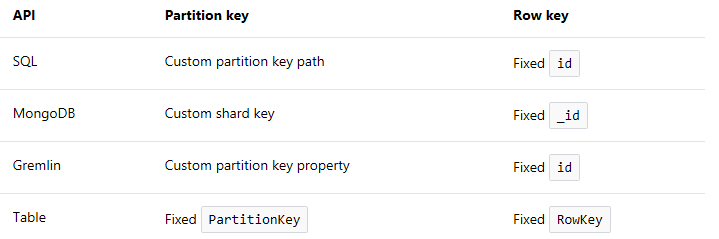
The following table denotes the partition key for the various API for Cosmos DB:
 Source: https://docs.microsoft.com/en-us/azure/cosmos-db/partition-data[/caption]
Note: Azure Cosmos DB hashes the partition key value and uses the hashed result to determine which physical partition to store the item in. Items with the same partition key values are in the same physical partition.
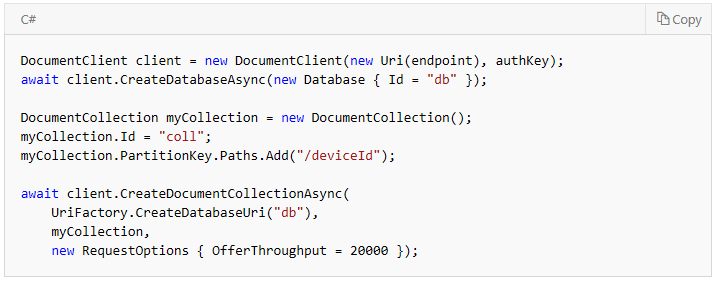
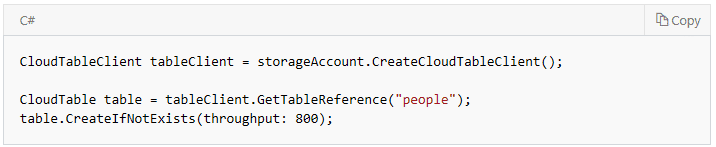
Create containers and scale them using Azure DB or Azure CLI specifying the throughput and the partition key. Here is how this can be achieved using various samples of API:
SQL API sample for creating a container:
 Source: https://docs.microsoft.com/en-us/azure/cosmos-db/partition-data[/caption]
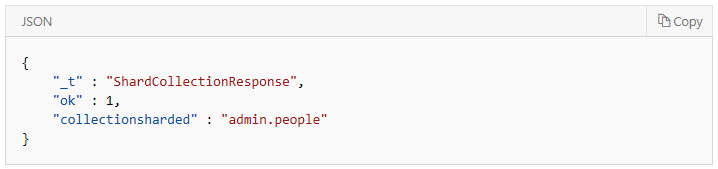
Mongo DB sample for creating a container in Mongo shell
 Source: https://docs.microsoft.com/en-us/azure/cosmos-db/partition-data[/caption]
The Result would be:
 Source: https://docs.microsoft.com/en-us/azure/cosmos-db/partition-data[/caption]
Table API sample to create a container using the CreateIfNotExists method
 Source: https://docs.microsoft.com/en-us/azure/cosmos-db/partition-data[/caption]
Partition Keys can also be created by concatenating and padding multiple property values into a single entity and are referred to as synthetic keys.
Azure DB is built upon atom-record-sequence (ARS) which not only supports a wide range of data models but also caters to various formats like document, graph, key-value, table and column-family data for flexibility in storing data. The following APIS are supported along with their respective SDKs:
- SQL API
- Mongo DB API
- Cassandra API
- Gremlin API
- Table API
Azure Cosmos DB allows scaling storage size automatically to cater to various requirements. It is important to select a good partition key while creating your container. A few examples of a good partition key in a couple of scenarios are as below:
For a user profile backend, the user ID is an ideal choice.
For any Internet of Things-related data, either device state or a device ID is a good choice for a partition key.
Note: Partition keys with high volumes of data should be avoided to make sure all data for a single partition key should be stored within the same physical partition
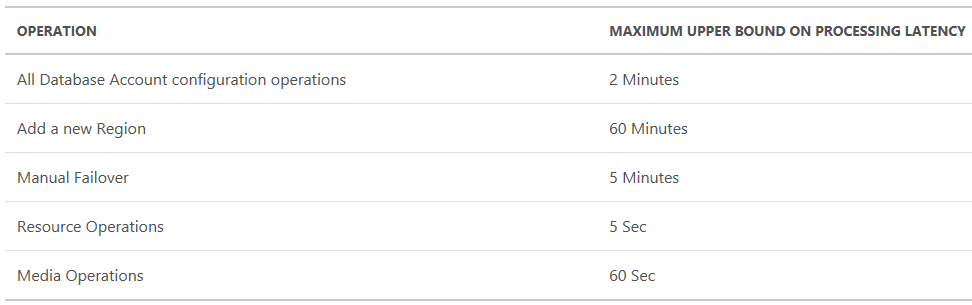
Azure Cosmos DB ensures 99.99% availability for all single-region with 99.999% read availability on multi-region database accounts- a parameter unmatched by any other service provider in the market.
Cosmos DB comes with a money-back guarantee with strict adherence to Service Level Agreements (SLAs) for availability, latency, throughput, and consistency for data. The following table is a perfect example:
 Source: https://docs.microsoft.com/en-us/azure/cosmos-db/partition-data[/caption]
The database engine for Azure processes queries at blazing fast speeds by indexing the data and iterating the schema associated with the application making it hassle-free and convenient.
Cosmos DB runs on an embedded java-script engine which allows stored procedures, triggers, and user-defined functions to be executed seamlessly without any hindrance making it the most comprehensive database in the world today.
The key features of Azure pave the path for it to be the most sought after database in the world today. In a nutshell here are the features that make it stand out from other DBMSs and RDBMSs:
- Provides global distribution in 30+ regions in the world
- Provides independent scaling of storage and throughput
- Provides 99% of reads in

Azure Cosmos DB: A Guide to Microsoft’s Database Service – Cuelogic An LTI Company
Azure Cosmos DB is Microsoft’s latest multi-model database which can be distributed globally across any geographic region. Launched in 2017, Azure Cosmos DB is enhanced over and above its predecessor- Azure DocumentDB. Cosmos DB manages to excel and improvise over other players in the market via adherence to Service Level Agreements (SLAs) in terms of their performance including throughput, availability, and consistency. It is available to try Free of charge without any subscription or commitment.
To understand the key functionalities of Azure, it is important to analyze its underlying architecture from a high level:
The figure above clearly indicates how Azure Cosmos DB functions in the data layer. Drilling down to the basics will yield more information on its Scalability, Resilience and Availability making it the front-runner for databases today.
To understand the benefits of Azure holistically, it is imperative to look at how Azure is compatible with each of the following popular architectural styles:
The traditional N-tier architecture for enterprise applications manages dependencies by dividing them into layers performing logical functions. Every new layer sits below the previous layer in a horizontal fashion. N-tier is used for migrating existing applications using infrastructure as a service (IaaS) solutions, or applications that use a mix of IaaS and managed services. Azure Cosmos DB can be deployed seamlessly with N-Tier architecture when used as an IaaS.
For a PaaS solution, a Web-Queue-Worker architecture provides a web front end handling HTTP requests and a back-end worker performing long-running operations communicating with each other through an asynchronous message queue. With Azure’s use as PaaS, this style of architecture is also suitable and deployable.
For a more complex domain, Microservices architecture is ideal where API contracts are used for communicating between services. With the use of DevOps culture and Azure’s flexibility, Microservices contribute to one of the key factors for its popularity.
Last but not the least, Event-Driven Architectures using a publish-subscribe (pub-sub) model, are capable of handling applications ingesting and processing huge chunks of data with minimum latency, Azure Cosmos excels in here as well with its scalability. Internet of Things(IoT) is an ideal example
Apart from supporting the above conventional styles of architecture, Azure Cosmos DB also supports Big Data and Big Compute making it one of the most versatile solutions in the market today.
Azure inculcates the following 10 design principles for its hosted applications:
Azure Cosmos DB follows the 5 criteria for quality adherence with well-defined Service Level Agreements (SLAs):
In the following section, we are going to explore these attributes in further detail with respect to its Key Features.
Data can be distributed globally to any number of Azure regions with just a click of a button, thereby allowing storage nearest to the customers reducing possible latency issues. This is achieved using Azure’s multi-homing APIs which identify the nearest data center to the user’s location. It allows flexibility to allocate multiple numbers of regions without any changes in configuration or availability of the stored data.
Scaling of storage In Azure Cosmos DB is transparent and automatic to make your data management easier. It supports the following 2 types of containers across all APIs:
Fixed Container: Fixed containers can store up to 10 GB with a maximum of 10,000 request units per second (RUPS). Fixed containers are created without specifying any partition key property in the data.
Unlimited container: Unlimited containers can automatically scale data beyond 10-GB through horizontal partitioning with auto-balancing of data based on the partition key specified. This allows storage of virtually unlimited amounts of data up to 100, 000 request units per second or more by getting in touch with their support team.
Cosmos DB allows automatic partitioning capability using containers for storing data titled collections (for documents), graphs, or tables. These Containers or logical resources span physical partitions or servers. Cosmos DB determines the number of partitions across servers based upon the size of storage and throughput commissioned for the container. Each document is assigned a partition key and a row key for unique identification and prevents Azure Cosmos DB from distribution across various physical partitions.
The two types of possible partitions are:
Physical Partition: These partitions provide fixed SSD-Backed storage with variable compute resources namely CPU and Memory. Azure automatically scales the number of physical partitions based on workload and hence the identification of the right partition key is important.
Logical Partitions: Logical partition is a partition within a physical partition which stores all data with a pre-defined partition key value. As a result, multiple logical partitions can be stored in the same physical partition.
Let us look how partitions are achieved in Azure Cosmos DB.
Documents consist of a Partition Key and a Row Key, unique identifiers which form the backbone of the partitioning system. Partition Keys form the logical partition of the data which reside within a single physical partition managed by Azure Cosmos DB succinctly.
To achieve successful partitioning in Cosmos DB, the following are imperative:
The following table denotes the partition key for the various API for Cosmos DB:
Note: Azure Cosmos DB hashes the partition key value and uses the hashed result to determine which physical partition to store the item in. Items with the same partition key values are in the same physical partition.
Create containers and scale them using Azure DB or Azure CLI specifying the throughput and the partition key. Here is how this can be achieved using various samples of API:
SQL API sample for creating a container:
Mongo DB sample for creating a container in Mongo shell
The Result would be:
Table API sample to create a container using the CreateIfNotExists method
Partition Keys can also be created by concatenating and padding multiple property values into a single entity and are referred to as synthetic keys.
Azure DB is built upon atom-record-sequence (ARS) which not only supports a wide range of data models but also caters to various formats like document, graph, key-value, table and column-family data for flexibility in storing data. The following APIS are supported along with their respective SDKs:
Azure Cosmos DB allows scaling storage size automatically to cater to various requirements. It is important to select a good partition key while creating your container. A few examples of a good partition key in a couple of scenarios are as below:
For a user profile backend, the user ID is an ideal choice.
For any Internet of Things-related data, either device state or a device ID is a good choice for a partition key.
Note: Partition keys with high volumes of data should be avoided to make sure all data for a single partition key should be stored within the same physical partition
Azure Cosmos DB ensures 99.99% availability for all single-region with 99.999% read availability on multi-region database accounts- a parameter unmatched by any other service provider in the market.
Cosmos DB comes with a money-back guarantee with strict adherence to Service Level Agreements (SLAs) for availability, latency, throughput, and consistency for data. The following table is a perfect example:
The database engine for Azure processes queries at blazing fast speeds by indexing the data and iterating the schema associated with the application making it hassle-free and convenient.
Cosmos DB runs on an embedded java-script engine which allows stored procedures, triggers, and user-defined functions to be executed seamlessly without any hindrance making it the most comprehensive database in the world today.
The key features of Azure pave the path for it to be the most sought after database in the world today. In a nutshell here are the features that make it stand out from other DBMSs and RDBMSs: